Custom software / Electricians
Electrician quote and job management software for Ontario contractors
Every enquiry, quote, job and invoice on one record, from the first call to the last payment. A crew view for the truck, an office view for the desk and a clear picture for the owner. Custom-built around how your shop works.
Everything on this page is a working prototype with sample data. The company, the customers and the figures are made up.
Explainer: a job from first call to final invoiceA sample electrical contractor: an enquiry arrives, a quote is built from line items, an accepted quote becomes a scheduled job, the crew sees it on a phone, the invoice starts from the job, and one list shows what needs attention today. One continuous voiceover with on-screen captions.
Read the video script
Quotes here, jobs there, invoices somewhere else? This is a client management dashboard for electrical contractors. Here is how it works. Step one: website and phone enquiries land in one place, each with an owner and a stage. Step two: quotes come from your own price list, with HST worked out, ready to print. Step three: an accepted quote becomes a scheduled job on the crew calendar. Each job carries a checklist, materials, and permit and inspection fields for your own tracking. Step four: the crew sees today’s jobs on a phone, with call, directions and a checklist. No prices on their screen. Step five: the invoice starts from the job, and overdue ones are flagged. One list shows what needs attention today: quotes waiting, invoices past due, service reminders. Drafts are never sent automatically. What that means: one place from enquiry to paid invoice, with reports for the owner. Each role gets its own view: owner, office and crew. Custom-built for your business, with no templates. Book a 20-minute scoping call.
Sound familiar?
What owners say out loud.
- The quote is on my phone and the customer’s number is in my texts.
- I sent a dozen quotes. Which ones are still waiting on an answer?
- I do the invoices on Sunday night, from memory.
- The permit and inspection dates are on a sticky note on the dash.
A good electrician is not slow at the paperwork on purpose. The work just happens in the truck, and the paperwork happens in six different places.
Written as the kind of thing an owner says out loud. These are not quotes from named clients.
What the system does
One record for the whole job.
What is electrician quote and job management software? It is the software that keeps an electrical contractor’s enquiries, quotes, jobs, crew schedule and invoices on one record, so an accepted quote becomes a scheduled job and then an invoice without being retyped. This one is custom-built around your price list and your shop, and it sits beside your accounting software.
- 01
Every enquiry in one list
Calls, web forms, texts and referrals land in the same place. Each shows where it came from and who owns it, so nobody assumes somebody else rang back.
- 02
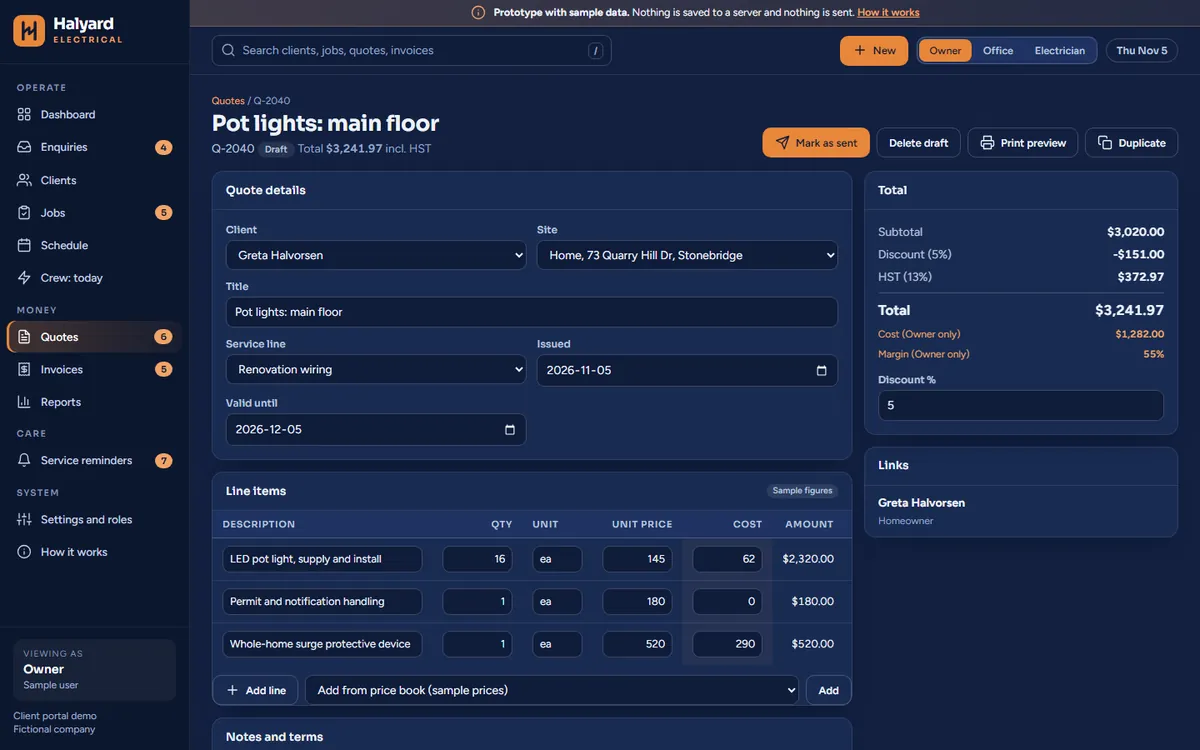
Quotes built from your own price list
Pick your materials and labour, add a note, and the quote is laid out with your company details. Tax is a setting you control. Each quote shows its status: draft, sent, accepted or declined.
- 03
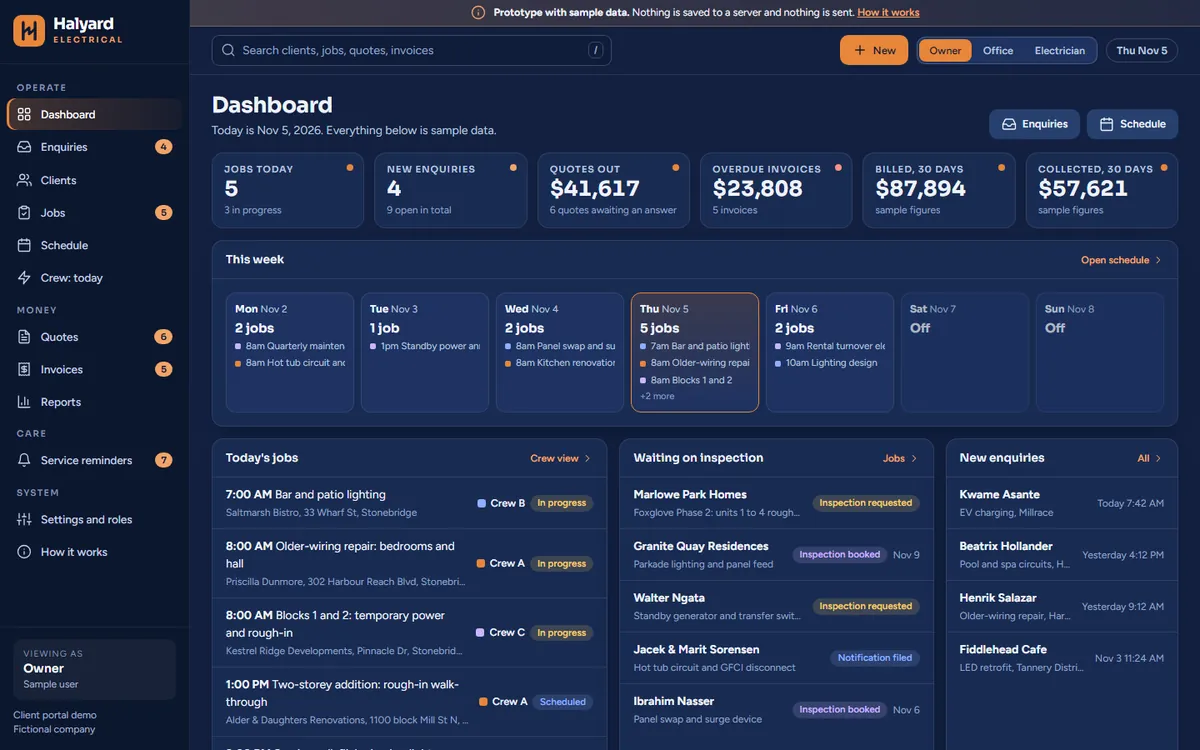
A “Follow-ups due” list: what needs attention today
Quotes waiting on an answer, invoices past due and reminders coming up, each with its date and who owns it. You decide what belongs on it and how many days “waiting” means.
- 04
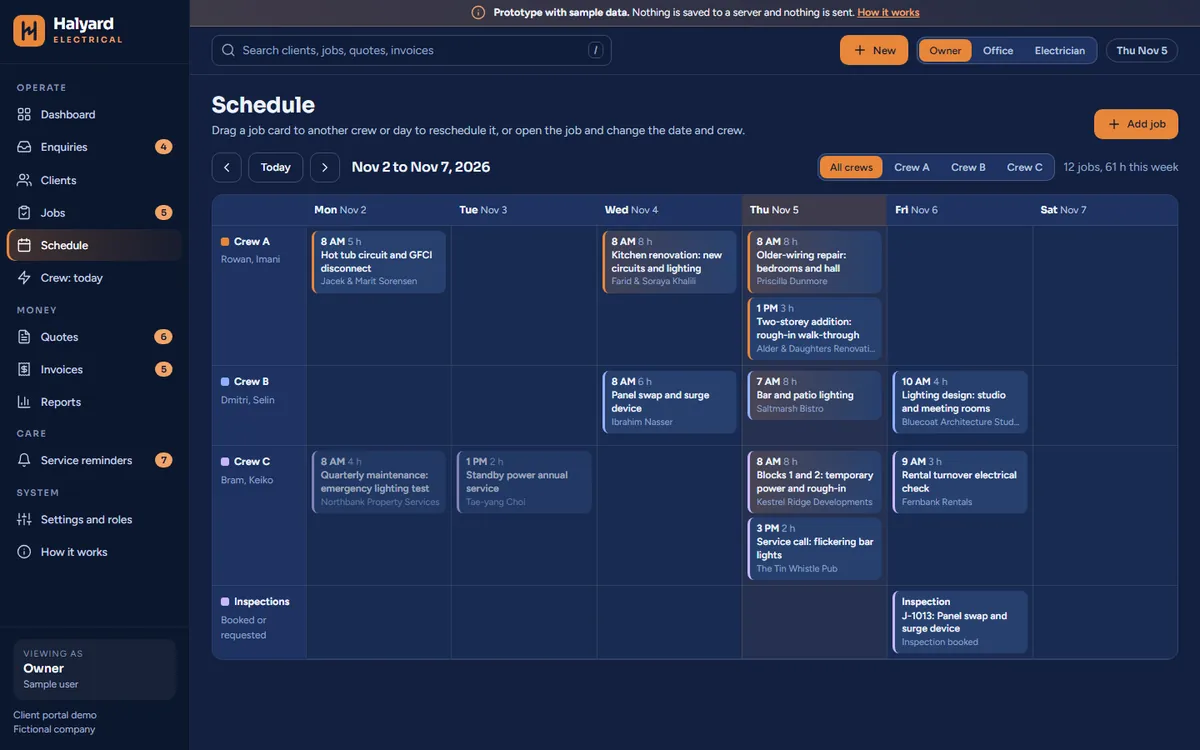
A schedule for jobs and crews
When a quote is accepted it becomes a job, and the job goes on the calendar against a person or a crew. The week is visible at a glance, not built from memory.
- 05
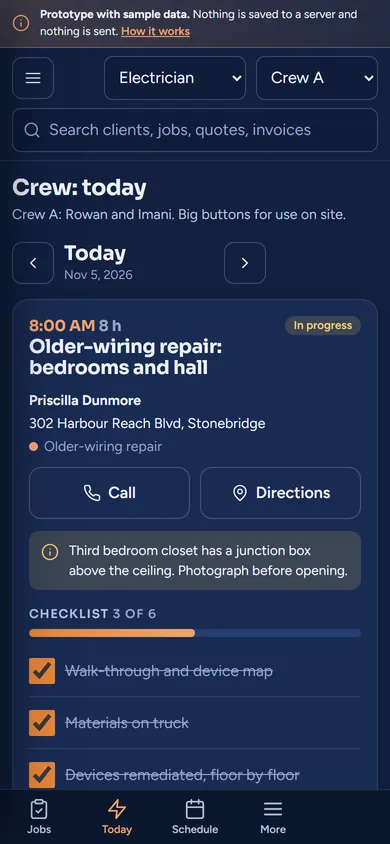
A crew view made for a phone
Electricians sign in and see their own jobs: address, contact and notes. No pricing, no margins, nothing they do not need on a ladder.
- 06
A place for permit and inspection details
Each job has fields for the permit or notification number and the inspection status. You decide what your shop tracks and what the options are. The system keeps the record; it does not tell you what the rules are.
- 07
Invoices built from the job
When the work is done, the invoice starts from the quote and the job, so nothing is retyped. Unpaid invoices are flagged and age on a list the office can work through.
- 08
The owner’s numbers on one screen
Quotes out, quotes accepted, jobs on this week, invoices unpaid. The questions you ask every Monday, answered before you ask.
See it working
Follow one job from the first call to the final invoice.
The explainer at the top of the page shows the idea. Below is a wider clip, then the working sample.
Watch the full walkthrough, about 6 min
Short clip 0:19
The short story, wide screenThe same short story as the reel in a wider layout, for a desktop screen. Voiceover and on-screen captions.
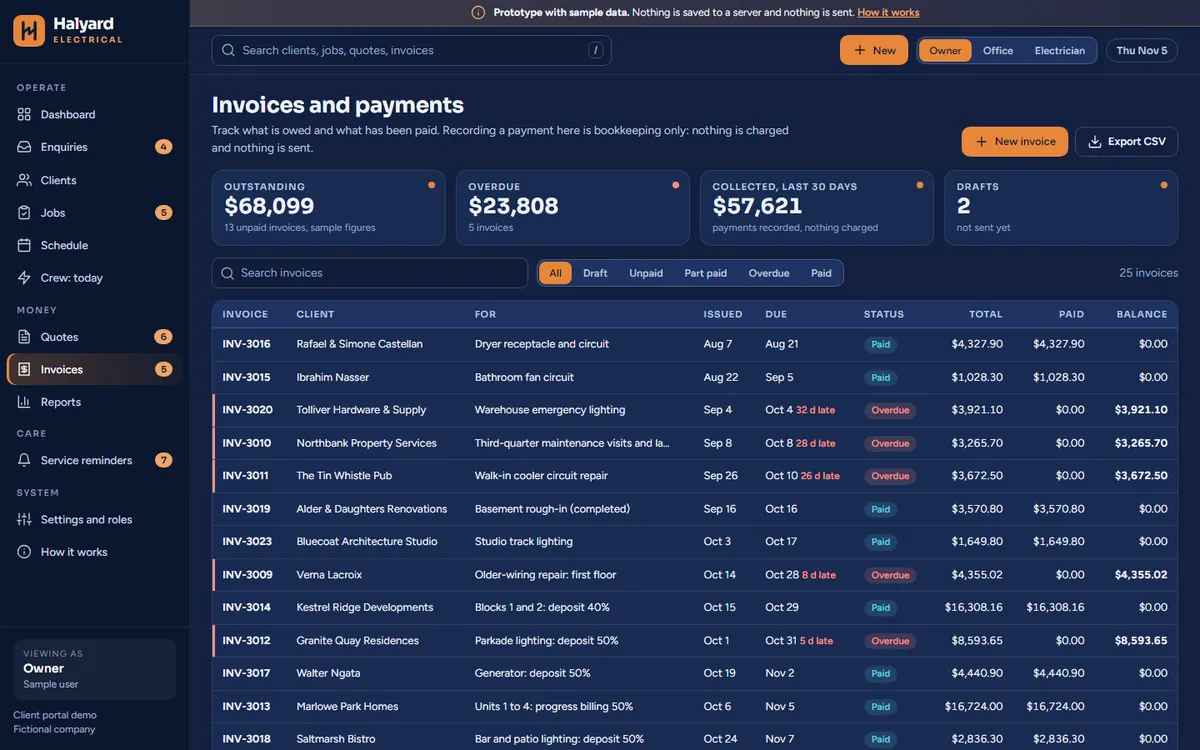
Try the sample yourself
Open the working prototype for Halyard Electrical.
A made-up electrical contractor, built for this page. Switch between the owner, office and electrician views and see how much each one shows. A white and amber version of the same sample is one click away.
Full walkthrough
Watch the full walkthrough.
About six minutes, narrated, with captions on screen. Everything in it is a sample with invented data.
Full walkthrough 5:45 · about 6 min
Full walkthrough of the sample electrical contractor systemA narrated tour of the sample contractor system: the dashboard, the enquiry pipeline, clients, jobs, the quote builder, invoices, the crew schedule, service reminders, reports and roles. Narrated, with on-screen captions.
How it works with Website Mill
Start with a conversation, not a contract.
A short call to scope it.
Twenty minutes. We ask how a job moves through your shop today, where the quotes live and what you already use. You decide whether it is worth going further.
An optional Systems Review.
If you would like more than a conversation, we offer a short, paid review week where we watch the work, talk to the people who do it and hand you a written plan.
Custom-built, no templates.
Your price list, your quote layout, your job stages and your roles. We do not start from a template and bend it.
A real version is scoped with you.
Where it is hosted, who can see what and how information is backed up are decided with you and written down before any real customer information is stored. How it is set up, hosted and looked after is something we work out together when we scope it.
Questions
Questions owners ask.
How is it set up, hosted and looked after?
How it is set up, hosted and looked after is something we work out together when we scope it. We agree the details together in the scoping conversation and write them down before any build starts.
Is our customer information safe?
The sample on this page contains no real information. For a real version, we would specify individual sign-ins, what each role can see, where information is stored and how it is backed up, in writing, before any real customer information goes in.
Can it work with QuickBooks and take payments?
It can be built to sit alongside accounting software and to send customers a payment link, where those tools offer a way in. Exactly what connects is confirmed during scoping. The sample connects to nothing.
Will my crew actually use it?
The crew view is deliberately small: today’s jobs, the address, the notes. If it takes more than a glance, it is the wrong screen, and we would change it. A walkthrough with your team is planned in before it goes live.
What if we want changes later?
Expect them. Shops change what they offer, what they charge and how they work. Because it is custom-built, it can be adjusted. How changes are handled after launch is something we agree together in scoping and write down before any build starts.
Can it sit beside the tools we have now?
Yes. It does not have to replace your accounting software, your calendar or your price list. Most shops begin with the part that hurts most, usually quotes, and add the rest later.
Is this job costing or accounting software?
No. The sample builds quotes from a price list and starts invoices from the job, but it is not an accounting package. It is designed to sit beside the accounting software you already use, and what a real version connects to is confirmed in scoping.
Keep reading
More from Website Mill.
- Management systems for local businessesThe overview: three working samples, one approach.
- Dental office patient intake systemRegistration done before the first visit.
- Gym lead management systemA name and a follow-up time on every enquiry.
- Custom software for small businessesBooking, check-in, portals and dashboards, custom-coded.
- Custom software for a small business, explainedA plain-English guide to what it is and when it is worth it.
- Website Mill servicesWebsites, brand work and custom software from one studio.
Tell us where your quotes live today. We will tell you if it is worth building.
This page describes office and scheduling software. It does not state electrical code, permit, licensing or inspection requirements, which vary and should be confirmed with the relevant authority.