Software built around how your business actually runs.
Booking, client lists, staff logins, check-in at the front desk, the owner’s dashboard. The things your team uses fifty times a day — custom-coded for you, connected to your website, and yours to keep.
Every business on this page is a sample — the names and numbers are invented.
You own it — code, data and accounts
Works with what you use — Jane, Square, Stripe, Google
A login per person — everyone sees what their job needs
Fixed price before we start
What we build
The part that happens after someone finds you.
A website gets the enquiry. What happens next usually runs on an inbox, a spreadsheet and somebody’s memory. These are the systems we build to replace that — one at a time, or joined together.
Owner dashboards
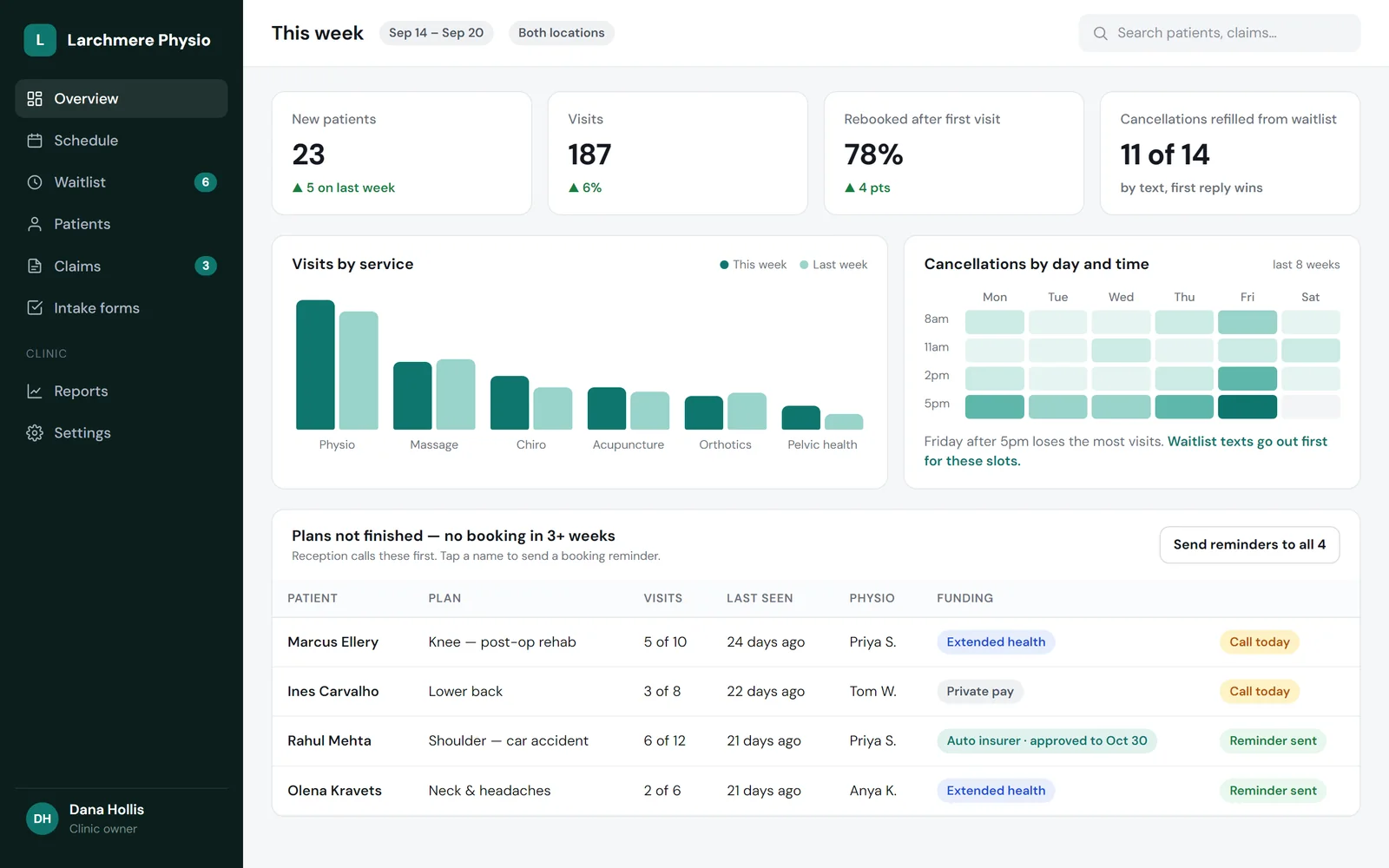
The numbers you actually ask about, on one screen.
Not a wall of charts. The five questions you ask every Monday, answered before you ask — and a list of what needs doing today.
New customers, visits and rebookings, week on week
Where cancellations cluster, so you know which slots to protect
A “call these people” list: plans started, never finished
On your laptop, or on a screen on the wall
Good for: clinics, gyms, salons, multi-location shops
Leads & client management
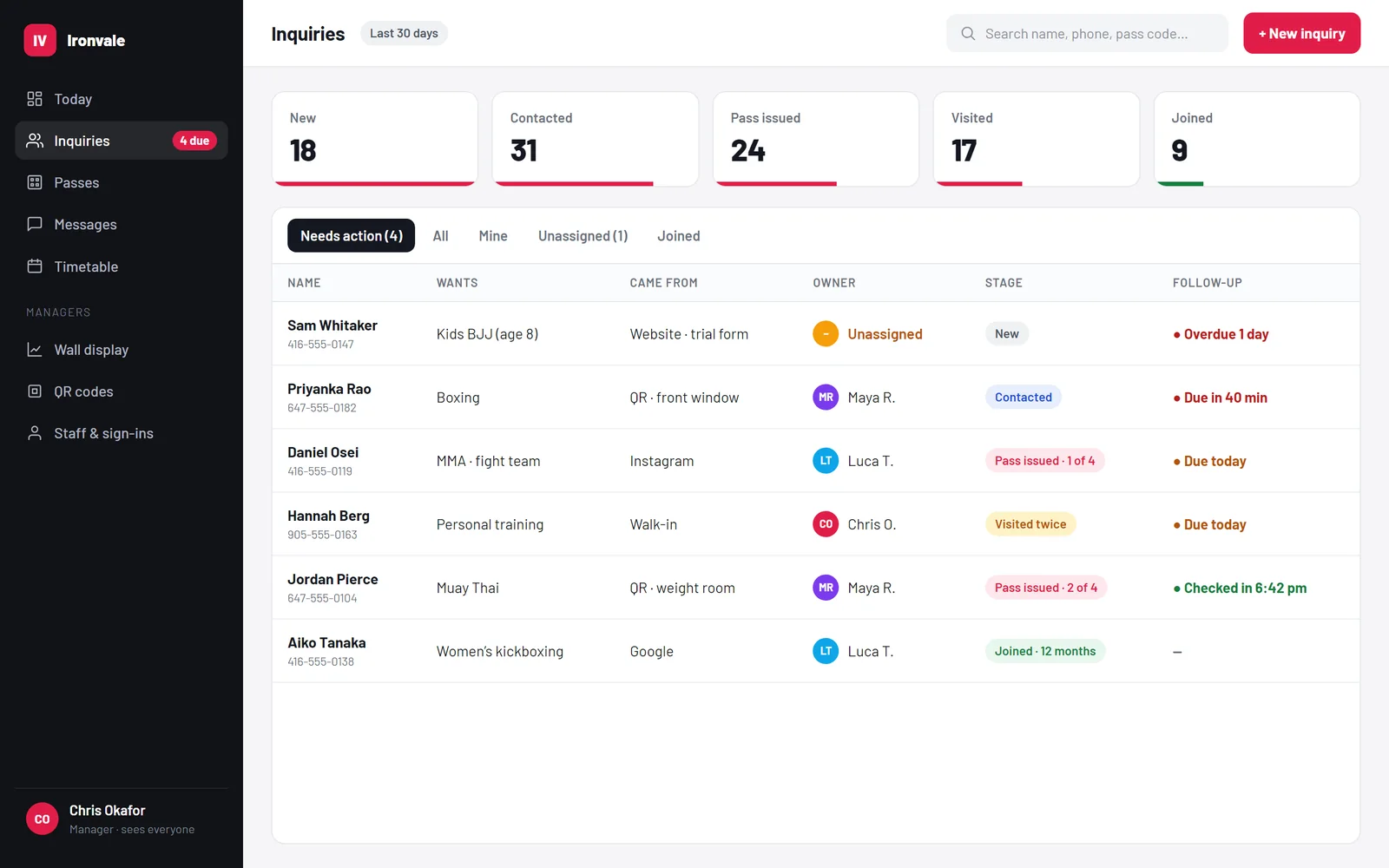
Every enquiry has one name against it and a clock running.
Enquiries from the website, the phone, Instagram and the walk-in all land in one list. Each one has an owner, a stage and a follow-up time — so nobody goes quiet because everyone assumed someone else had called back.
Shows which poster, page or ad each enquiry came from
Overdue follow-ups turn red; unowned ones go to a manager
A rep sees their own people; a manager sees everyone
Good for: gyms, trades, clinics, anyone who quotes or books consultations
Front desk & check-in
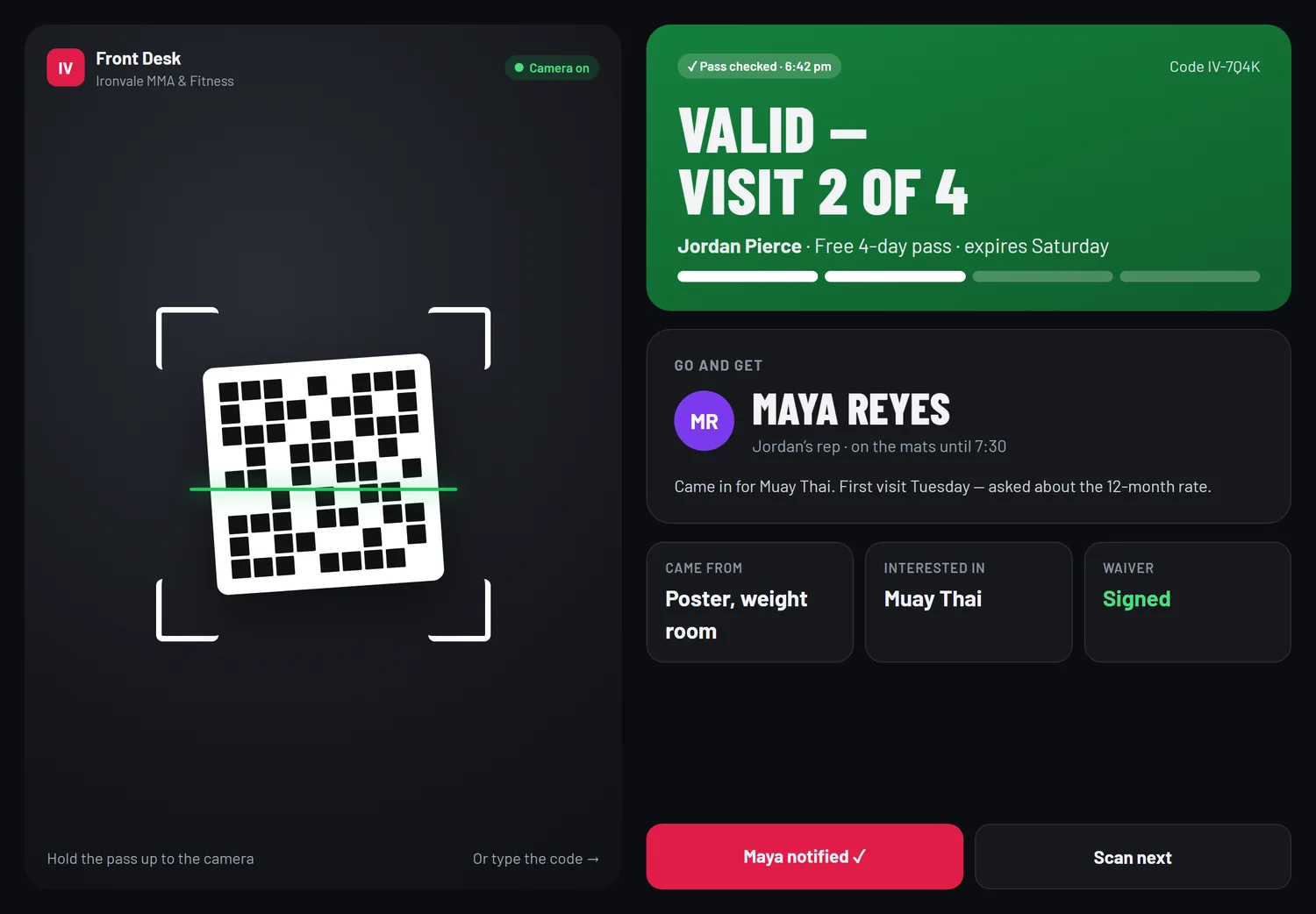
Scan a pass at the door. The screen tells you who to fetch.
Trial passes, memberships, class packs and appointments, checked with the tablet’s camera. A check that stops at “valid” leaves somebody standing at the counter — ours ends by naming the person who should come and say hello.
Passes issued at the counter or from the website, with QR codes
Used, expired and borrowed passes caught at the door
Printed QR codes around the building that show which sign worked
Good for: gyms, studios, clinics, events, venues
Staff portal & sign-ins
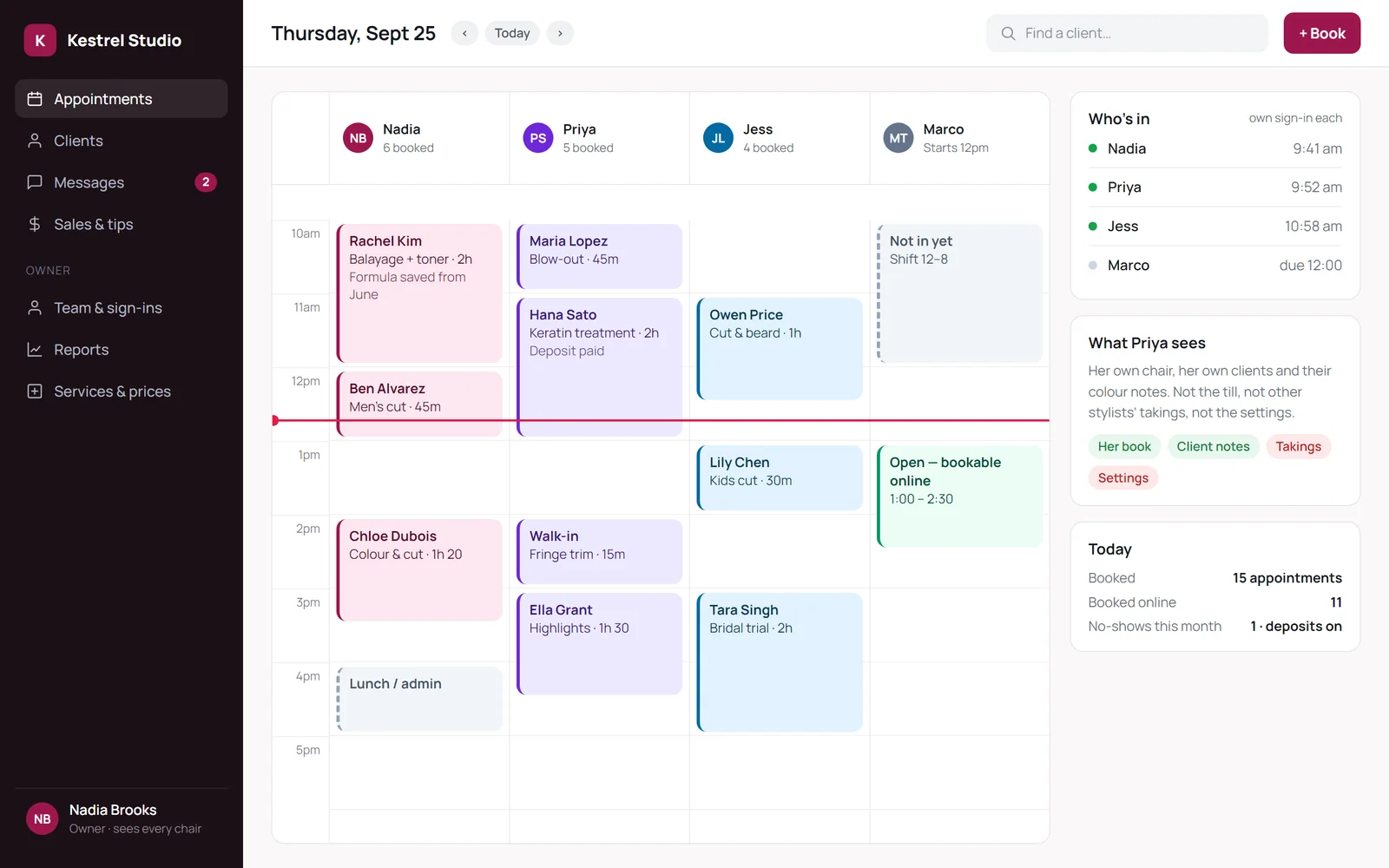
Everyone signs in at their own door and sees their own job.
No shared password taped to the monitor. Each person has their own login, and the owner decides what each role can see — a stylist sees her book and her clients’ notes, not the till or the settings.
Roles and permissions that match how your team works
Sign-in times, so you know who’s in
A staff handbook built in, so “how do I…” has an answer
Good for: salons, clinics, gyms, any team bigger than two
Online ordering, your own checkout
Orders and payments that go straight to you.
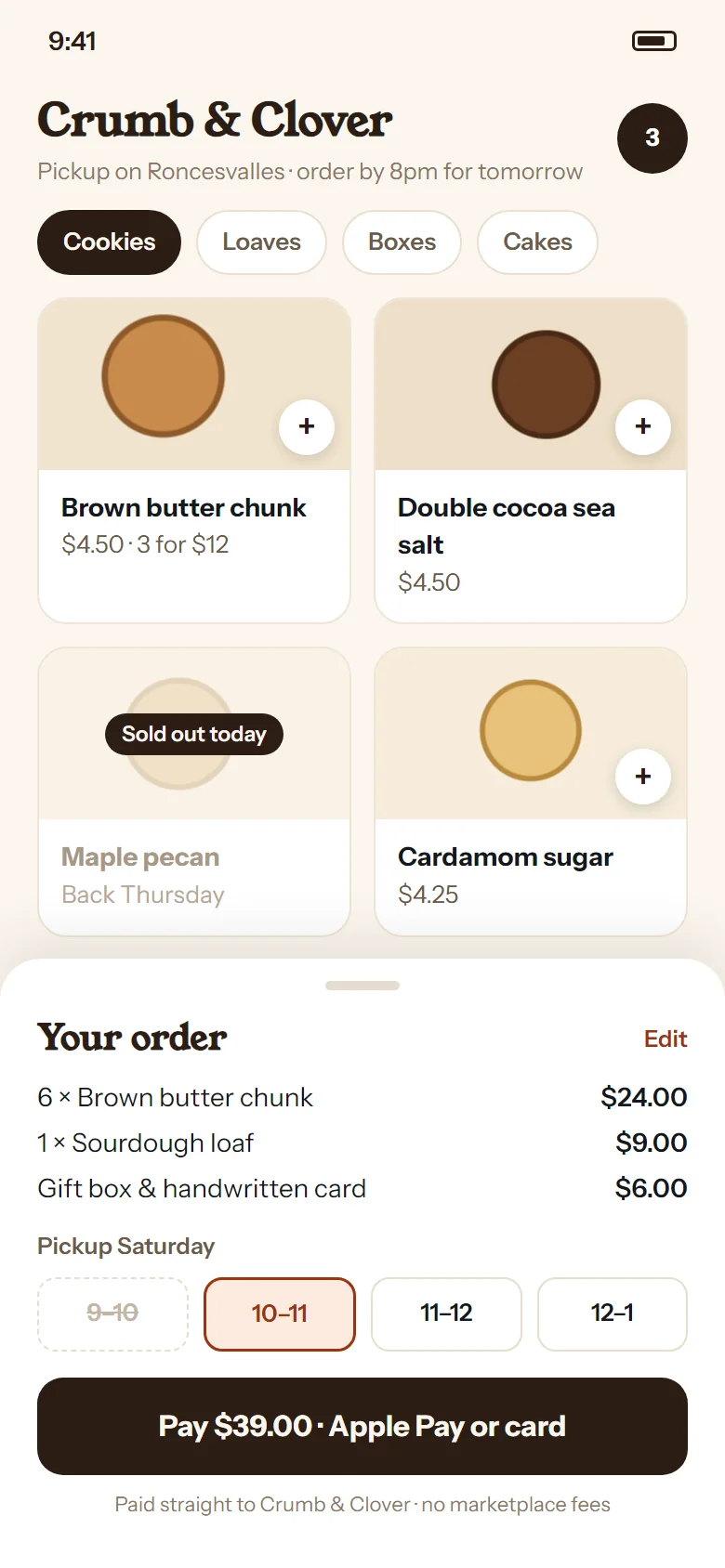
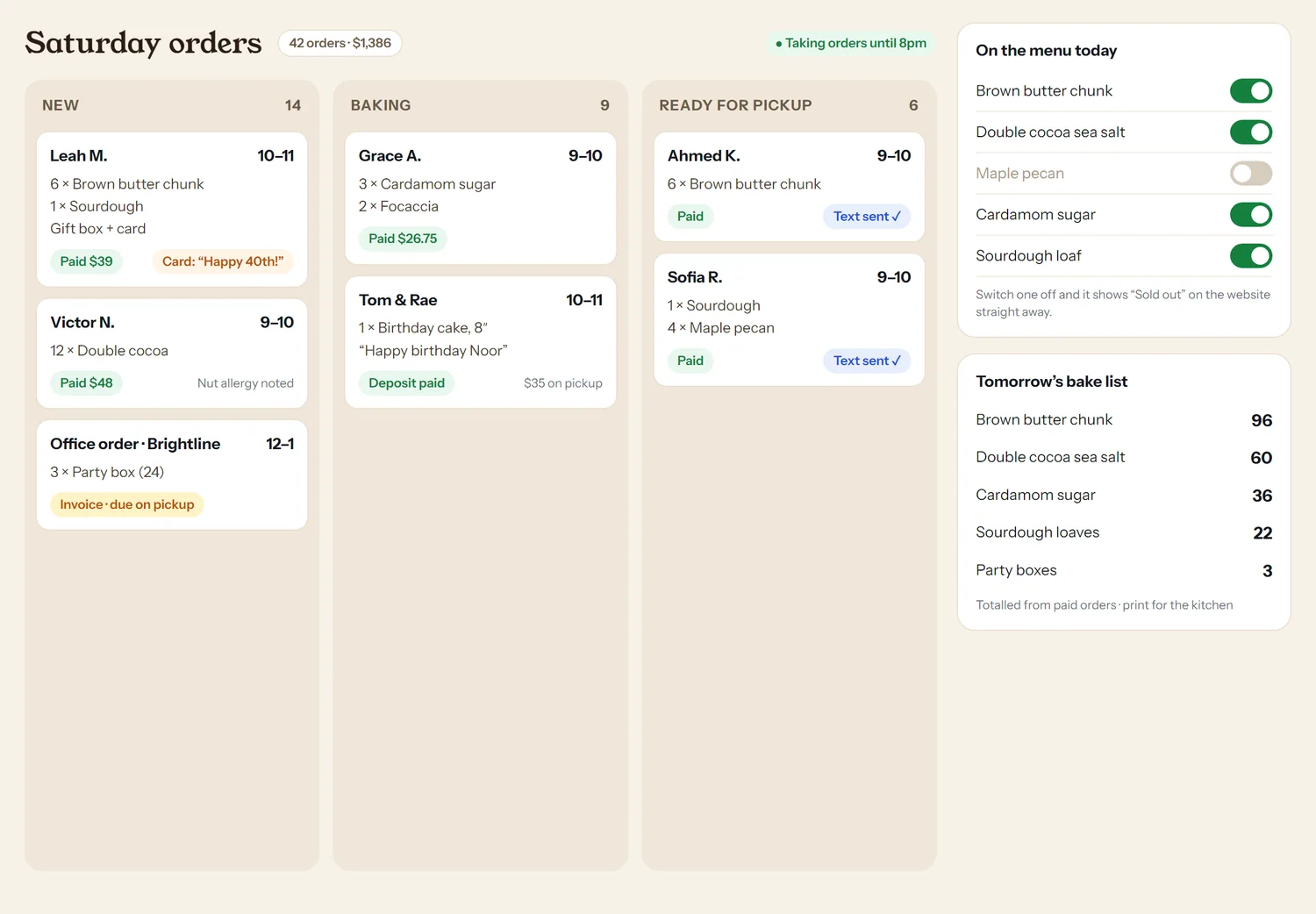
Customers order and pay on your website — no marketplace in the middle, no per-order commission. Behind it, one board for the kitchen or the shop floor.
Pickup windows that fill up, and a cut-off time you set
Flip one switch and an item shows “sold out” on the site
Tomorrow’s bake or prep list, added up from paid orders
Good for: bakeries, restaurants, caterers, makers, small shops
On your customers’ phones
The parts your customers touch.
Built for the phone first, because that’s where people book, order and ask questions.
Booking & waitlists
Pick a service, a person and a time. If nothing suits, join the waitlist — when a slot opens, we text the list and the first YES gets it.
Ordering & payment
Your menu, your prices, your pickup times. Paid by card or Apple Pay, straight into your own account.
A trained assistant
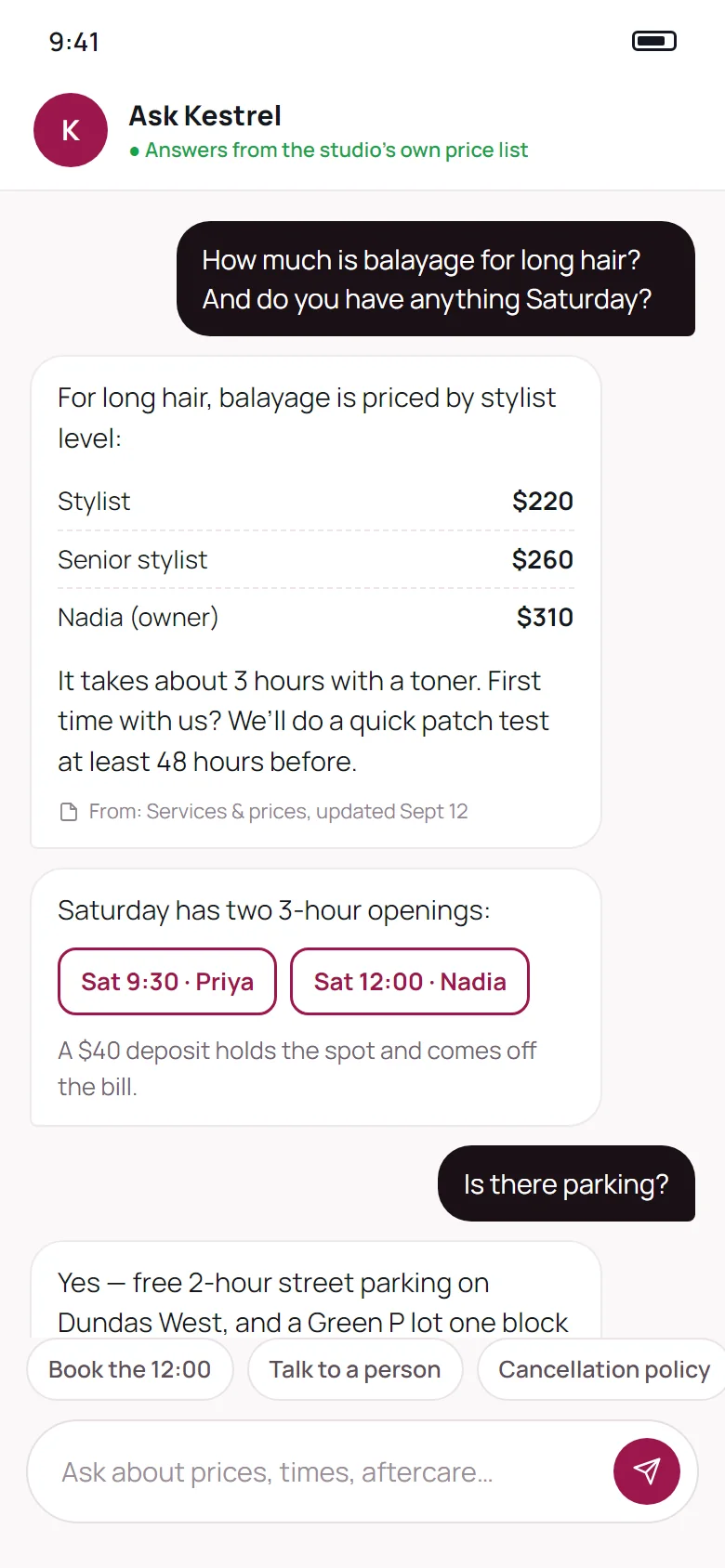
Answers questions from your own price list, policies and hours — and says where the answer came from. When it doesn’t know, it hands over to a person.
Client portals
Quotes to approve, deposits to pay, and a job status the customer can check themselves — instead of calling to ask.
Try it
What the front desk sees.
Tap a pass below. Each answer tells the person at the desk exactly what to do next — that’s the whole idea.
Pass checked · 6:42 pm
Valid — visit 2 of 4
Jordan Pierce · Free 4-day pass · expires Saturday
Go and get
Maya Reyes
Jordan’s rep · on the mats until 7:30. Came in for Muay Thai; asked about the 12-month rate.
By kind of business
What we’d build for you.
Everything here we’ve either built or scoped for a real business. Most people start with one piece.
Clinics & med-spas
Physio, chiro, dental, injectables
Booking that routes people to the right practitioner
Cancellation waitlist by text
Intake and consent forms before the first visit
Claims and approvals tracker
Owner dashboard
Gyms & studios
Martial arts, fitness, yoga, dance
Trial passes with QR check-in
Lead list with follow-up clocks
Staff portal with roles
Class timetable and personal training
Wall display for the front desk
Food & retail
Bakeries, restaurants, caterers, shops
Online ordering with your own checkout
Pickup windows and order cut-offs
Kitchen or shop-floor order board
Sold-out switches the owner can flip
Gift cards and pre-orders
Salons & trades
Hair, beauty, plumbing, contractors
Appointment book with deposits
Quotes customers approve online
Job status customers can check
A trained assistant for prices and times
Staff sign-ins and schedules
How it works
Scoped first. Then priced. Then built.
Week 0 · free
A systems call
Thirty minutes on what’s slowing you down. Sometimes the honest answer is that software you already pay for can do it — and we’ll say so.
Optional · one week
A systems review
For bigger jobs: we sit with how your business actually runs and write down what’s worth building, in what order, at what price.
Weeks, not months
Built and tested
A fixed price before we start. You see it working early, your staff try it before launch, and we fix what they trip over.
After launch
Yours to keep
You own the code and the data. Software Care keeps it hosted, backed up, updated and supported — or take it elsewhere.
Pricing
Starting prices. A fixed quote before any work.
Every business is different, so software is quoted after we’ve talked. These are where jobs start, so you know the ballpark before you call.
A single tool
From
$900
One focused piece added to your site or your day.
e.g. a booking guide, an intake form, a QR equipment log, a quote request that lands in one list
A complete system
From
$2,500
One system your team uses every day, with logins for everyone who needs one.
e.g. booking with a text waitlist, a lead list with follow-ups, online ordering with its own checkout, a staff portal
A connected setup
From
$10,000
Several systems joined together, sharing one set of customers and one dashboard.
e.g. passes, check-in, leads, staff portal and a wall display for a gym — website included
Systems review
A week with your business and a written, priced plan. The fee comes off the build if you go ahead.
$2,500credited to the build
Software Care
Hosting, backups, security updates, fixes and support for the software you own.
from $149a month
Prices in Canadian dollars, plus HST. Running costs such as text messages or card processing are charged at cost. Need a website too? Website plans are here.
Recently built
A gym’s whole front desk.
For a Toronto martial arts gym, the free-trial button used to send an email — nothing was issued, nothing was tracked. We built the system behind it: staff sign-in with roles, a lead list with a follow-up clock, four-day passes issued at the counter, camera scanning that names the rep to fetch, printed QR codes across the building and a wall dashboard. Plus the website in front of it.
43page website
14printed QR codes
58automated checks, run on demand
35page staff handbook
Questions
Before you ask.
Do I own the software?
Yes. The code, the data and the accounts are yours. If you ever stop working with us, it keeps running and you can take it to another developer.
We already use Jane, Square or Mindbody. Do we have to switch?
Usually not. Often the best answer is to build around the tool you already have — a better booking front door on your site, a dashboard that pulls from it, a waitlist it doesn’t offer. We’ll check what your current software can already do before we suggest building anything.
What about privacy and health information?
Where records include health or personal information, we plan how it’s stored and who can see it to meet Canadian and Ontario privacy rules, and keep it in Canada where that’s required. Everyone gets their own login and only sees what their role needs.
How long does it take?
Weeks, not months. A single tool is often done in a week or two; a complete system in three to six; a connected setup is planned in stages so you’re using the first part while we build the next.
Are there monthly fees?
The software itself has no licence fee. Software Care (hosting, backups, updates and support) starts at $149 a month, and anything that costs us per use — text messages, card processing — is passed on at cost.
We only need something small. Is that worth a call?
Yes. Plenty of the most useful things we build are small: a form that ends up in one list instead of five inboxes, a QR code that tells you which poster worked. Single tools start at $900.
Tell us what your team does with a spreadsheet.
That’s usually where the best software starts. A thirty-minute call, no cost, and an honest answer about whether building something is worth it.