Custom software / Clinics
Clinic intake and check-in system for physiotherapy, chiropractic and medical clinics
Patients register on their phone before the visit. A QR code at the door checks them in, and the waiting-room board updates. Clinicians see what they need, the front desk sees the rest. Custom-built around how your clinic runs, not squeezed into a template.
Everything on this page is a working prototype with sample data. The clinic, the clinicians and the patients are made up.
Explainer: from the waiting-room sign to the treatment roomA sample clinic: the patient registers on their phone, a QR code checks them in at the door, the waiting-room board updates, the front desk and clinicians see their own views, and a cancelled time is offered to the waitlist. One continuous voiceover with on-screen captions.
Sound familiar?
What clinic managers say out loud.
- The new-patient form is on a clipboard, and somebody retypes it afterwards.
- We find out who has arrived when someone looks into the waiting room.
- A cancelled appointment leaves a gap, and the waitlist is a page in a notebook.
- Referrals arrive by fax or phone tag, and half the details are missing.
None of this is anyone’s fault. It is what paper and memory do when a clinic is busy.
Written as the kind of thing a clinic manager says out loud. These are not quotes from named clients.
What the system does
From the waiting-room sign to the treatment room.
What is a clinic intake and check-in system? It is the software that collects a new patient’s registration before the first visit, checks them in when they arrive and shows the front desk who is in the waiting room, who is with a clinician and who is still to come. This one is custom-built around the visit itself. It is not a full clinical records or billing system, and it is designed to sit beside the software your clinic already uses.

- 01
Registration the patient does before they arrive
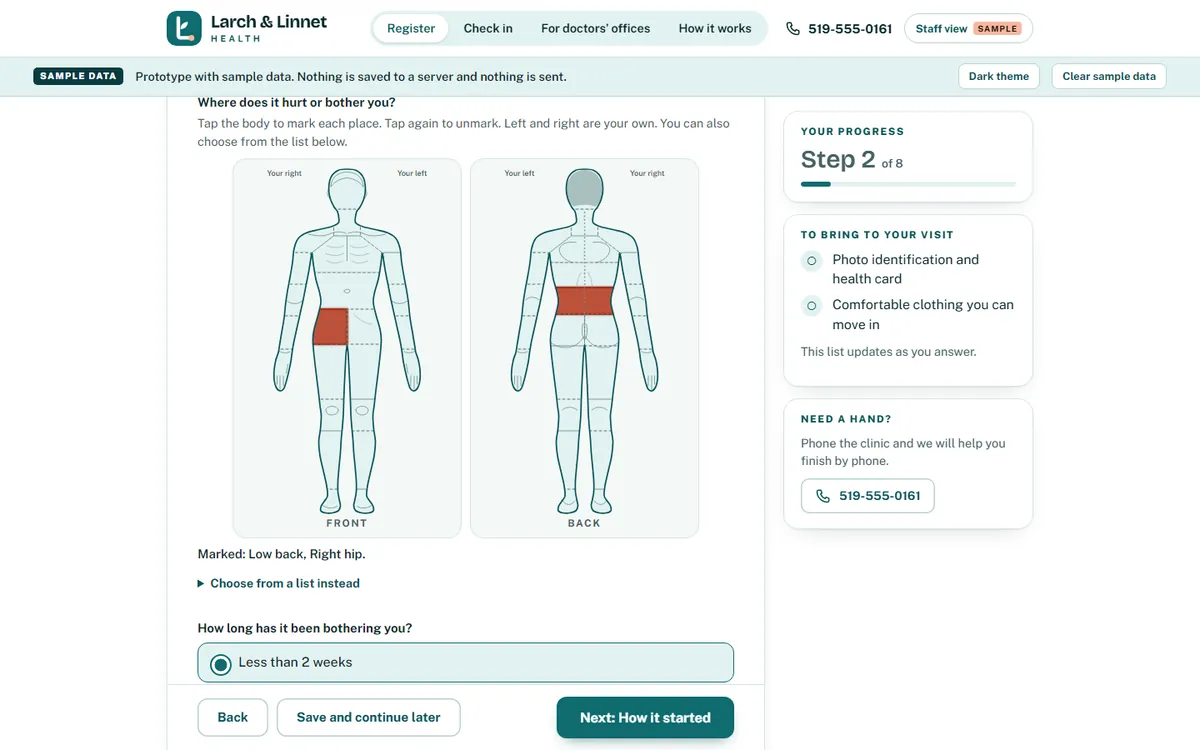
Eight short steps on a phone or a computer. Questions that do not apply are skipped, mistakes are caught as the patient types, and anyone who is interrupted can save and come back to the same step.
- 02
A body map instead of a paragraph
The patient taps where it hurts on a front and a back figure. The same choices are there as a plain list, and the map can be used from the keyboard.
- 03
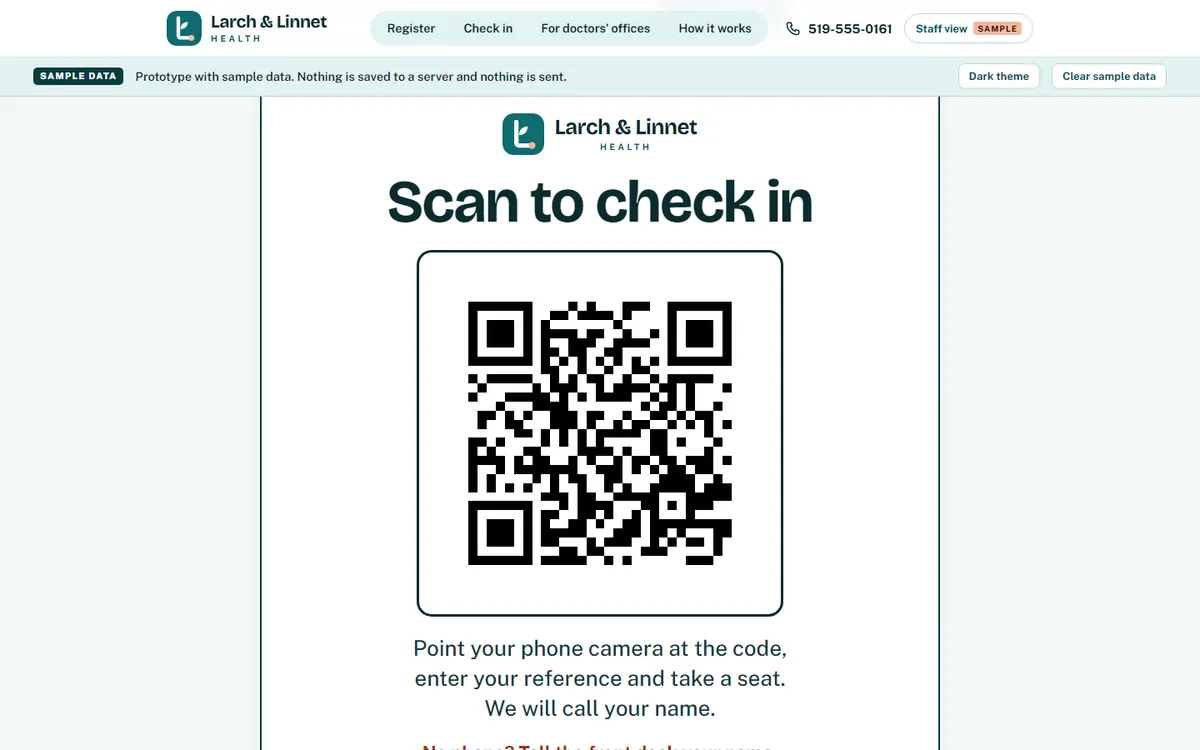
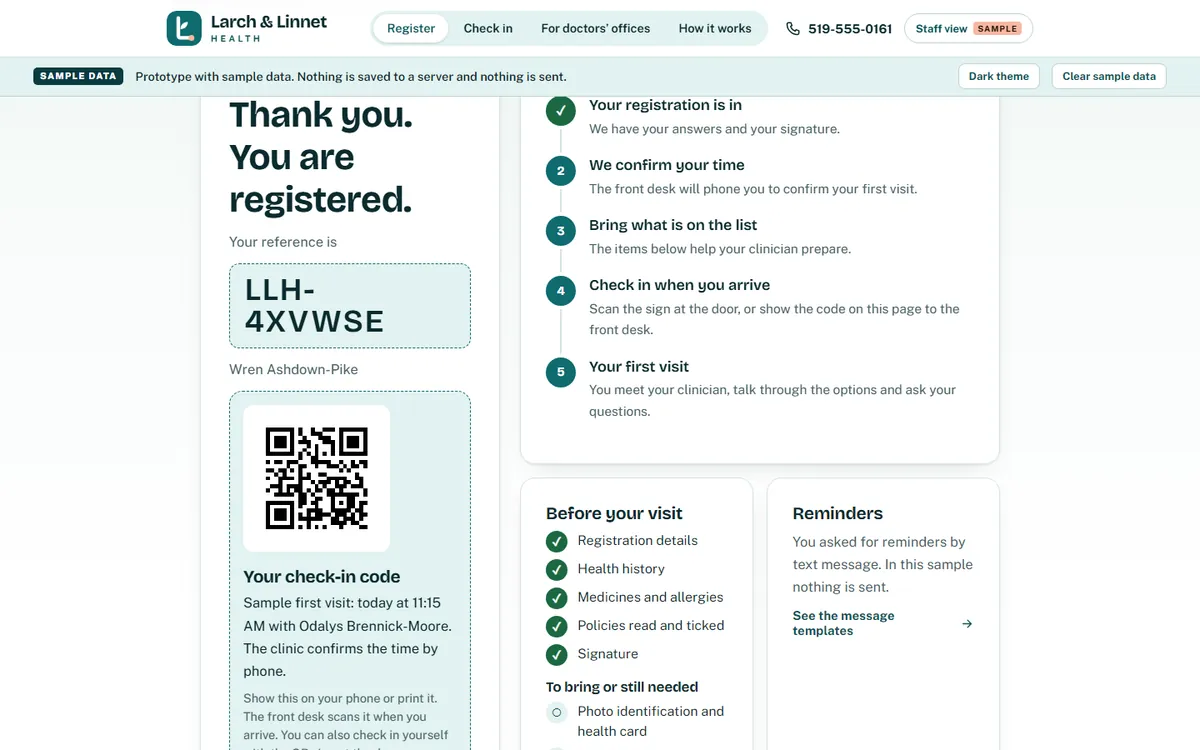
A QR code at the door, and one on every booking
A printed sign at the door opens the check-in page. Each registration also gets its own code, which the front desk scans when the patient arrives.
- 04
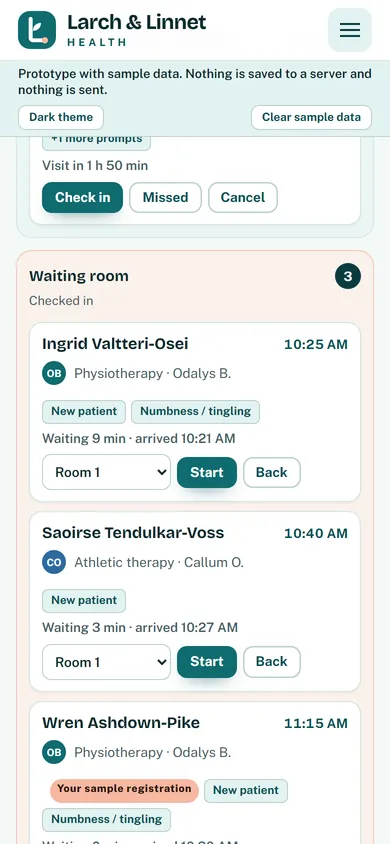
A waiting-room board that updates as people arrive
Expected, in the waiting room, with a clinician and done, with the arrival time and how long each person has waited. Missed and cancelled visits sit in a tray of their own.
- 05
Referrals from doctors’ offices in one short form
A doctor’s office sends the reason, the urgency, the preferred clinician and whether the letter is on its way. It lands in the staff list with a drafted acknowledgement.
- 06
A staff workspace with a view for each role
Clinicians, the front desk and managers each see what their job needs. The front desk does not see health answers or clinical notes, and the manager sees counts, not names. Each person signs in as themselves, and what each role can see is decided with you.
- 07
Review prompts for your clinicians
Where an answer is something a clinician will want to look at before the visit, the record marks it for staff review. The system does not interpret answers and does not give clinical advice. The prompts are yours to define with your clinicians.
- 08
Waitlist, recalls and progress checks
A cancelled time can be offered to the first person waiting. Recalls are listed with a drafted message. A short pain and everyday-function check shows progress over time. Every message is written in your words and is only a draft in the sample.
Your forms and policies stay in your words. Consents and policies are shown to the patient in full, exactly as your clinic writes them.
See it working
Watch a patient go from the door to the treatment room.
The explainer at the top of the page shows the idea. Below are a wider clip and the working sample.
Watch the full walkthrough, about 6 min
Short clip 0:27
The short story, wide screenThe same short story as the reel in a wider layout: the board, the body map, the ticket, a desk scan, roles, a waitlist offer and the manager dashboard. Voiceover and on-screen captions.
Try the sample yourself
Open the working prototype for Larch & Linnet Health.
A made-up physiotherapy, chiropractic and massage clinic in an invented town, built for this page. Register as an invented patient, check in with the QR code, then open the front desk board and watch the waiting room change. In the sample, the scan at the desk is simulated on screen.
Full walkthrough
Watch the full walkthrough.
About six minutes, narrated, with captions on screen. Everything in it is a sample with invented data.
Full walkthrough 5:52 · about 6 min
Full walkthrough of the sample clinic systemA narrated tour of the sample clinic system: registration on a phone with the body map, the confirmation and check-in code, the signs at the door, the front desk board, referrals in, the staff workspace, waitlist and recalls, progress checks and the claims tracker. Narrated, with on-screen captions.
How it works with Website Mill
Start with a conversation, not a contract.
A short call to scope it.
Twenty minutes. We ask how a new patient moves through your clinic today, what the front desk does by hand and which systems you already use. You decide whether it is worth going further.
An optional Systems Review.
If you would like more than a conversation, we offer a short, paid review week where we watch the work, talk to the people who do it and hand you a written plan.
Custom-built, no templates.
The forms, the roles, the waiting-room board and the messages are built around your clinic and your wording. We do not start from a template and bend it.
A real version is scoped with you.
Where it is hosted, who can see what, how long information is kept and how it is backed up are decided with you and written down before any real patient information goes near it. The privacy handling would be reviewed by the practice’s privacy officer and a lawyer before real use. How it is set up, hosted and looked after is something we work out together when we scope it.
Questions
Questions clinic owners ask.
How is it set up, hosted and looked after?
How it is set up, hosted and looked after is something we work out together when we scope it. We agree the details together in the scoping conversation and write them down before any build starts.
Is patient information safe?
The sample on this page contains no real information at all. For a real version, we would specify individual sign-ins, role-based access and where information is stored, in writing, and the practice’s privacy officer and a lawyer would review it before real use. We do not make compliance claims from a sample.
Can patients check in without an app?
Yes. The QR code opens an ordinary web page in the phone’s browser, so there is nothing to download. A patient who would rather not use a phone checks in at the front desk, as they do today.
Is this clinical records or billing software?
No. The sample covers the visit around the appointment: registration, check-in, the waiting-room board, referrals in, review prompts, progress checks and a simple tracker for claim and approval status. It is not a full clinical records or billing system, and it is designed to sit beside the software your clinic already uses.
Can it connect to the software we already use?
Often, yes, where the other software offers a way in. Which connections are worth making is part of the scoping conversation. The sample itself connects to nothing.
Will it work for physiotherapy, chiropractic and medical clinics?
The sample is a physiotherapy, chiropractic and massage clinic, because that mix shows most of the ideas. A doctor’s office or a family-medicine clinic asks different questions and uses different forms, so the registration, the review prompts and the roles are written with you for your clinic.
What if we want changes later?
Expect them. A clinic changes, and so does its paperwork. Because it is custom-built, it can be adjusted. How changes are handled after launch is something we agree together in scoping and write down before any build starts.
Keep reading
More from Website Mill.
- Management systems for local businessesThe overview: four working samples, one approach.
- Dental office patient intake systemRegistration done before the first visit.
- Gym lead management systemTrial passes that scan at the door, and a follow-up time on every enquiry.
- Custom software for small businessesBooking, check-in, portals and dashboards, custom-coded.
- Custom software for a small business, explainedA plain-English guide to what it is and when it is worth it.
- Website Mill servicesWebsites, brand work and custom software from one studio.
Tell us how your front desk works. We will tell you if it is worth building.
This page describes software for clinic administration. It does not provide clinical or legal advice and does not replace the judgment of a clinician or the advice of your privacy officer or lawyer.